Here at Unfinished Man, we cover a wildly diverse range of topics. Writer Rasha frequently tackles the tough realities of family dynamics and power, we’ve had our tech coverage featured on massive digital platforms like Men’s Journal, BoingBoing, Lifewire, The Awesomer, BuzzFeed, and Cracked, and we will even pause to investigate bizarre internet mysteries—like whether the model Olivia Casta is actually just Maria Tretjakova operating under an alias.
But behind all the lifestyle coverage, we are still running a business. Like most independent contractors, we need reliable, zero-friction systems to get paid. I have used the same barebones billing software for over five years, so I decided it was time to update my operational thoughts. I originally published my findings on November 17, 2021, but the reality is that the core methodology hasn’t fundamentally changed. You can still just hop directly onto the InvoiceToMe platform and solve your billing problems immediately.
Key Takeaways
InvoiceToMe requires absolutely zero sign-up or email registration to generate billing documents natively in your browser.
Since upgrading its security protocols to include a modern SSL certificate, the site now uses HTTPS to ensure any financial data you enter is encrypted before it leaves your device.
Because the generator strictly lacks data storage, you must export your work manually, as nothing is saved once you close the page.
Table of Contents
InvoiceToMe Review: 5 Years of Zero-barrier Billing
InvoiceToMe is completely free to use without any hidden costs, premium subscription tiers, or usage limits. If you need an InvoiceToMe review from a small business owner who continues to successfully send these exact files to real clients, the verdict is incredibly straightforward: this tool is a brilliantly effective, zero-friction workhorse for independent operations.
I have relied on this platform for more than half a decade to bill for immediate one-off projects. There is no bloated dashboard to navigate, no forced onboarding sequence, and no annoying upsells demanding your credit card info. You just land on the sterile page and get to work typing out your billable hours.
This kind of raw operational speed is precisely why software adoption is skyrocketing for independent workers globally. A 2024 TeamStage report found that 75% of freelancers now rely on digital software to help manage their finances and invoicing routines. That massive demand makes mathematical sense, given current projections showing there will be 90.1 million American freelancers participating in the modern workforce by 2028.
As the freelance economy expands rapidly, the ongoing demand for highly functional, low-barrier tools remains incredibly strong. You do not need to purchase massive, complex financial software bundles just to request a standard check for a weekend gig.
“You do not need to purchase massive, complex financial software bundles just to request a standard check for a weekend gig.”
Generating Invoices With the WYSIWYG Editor
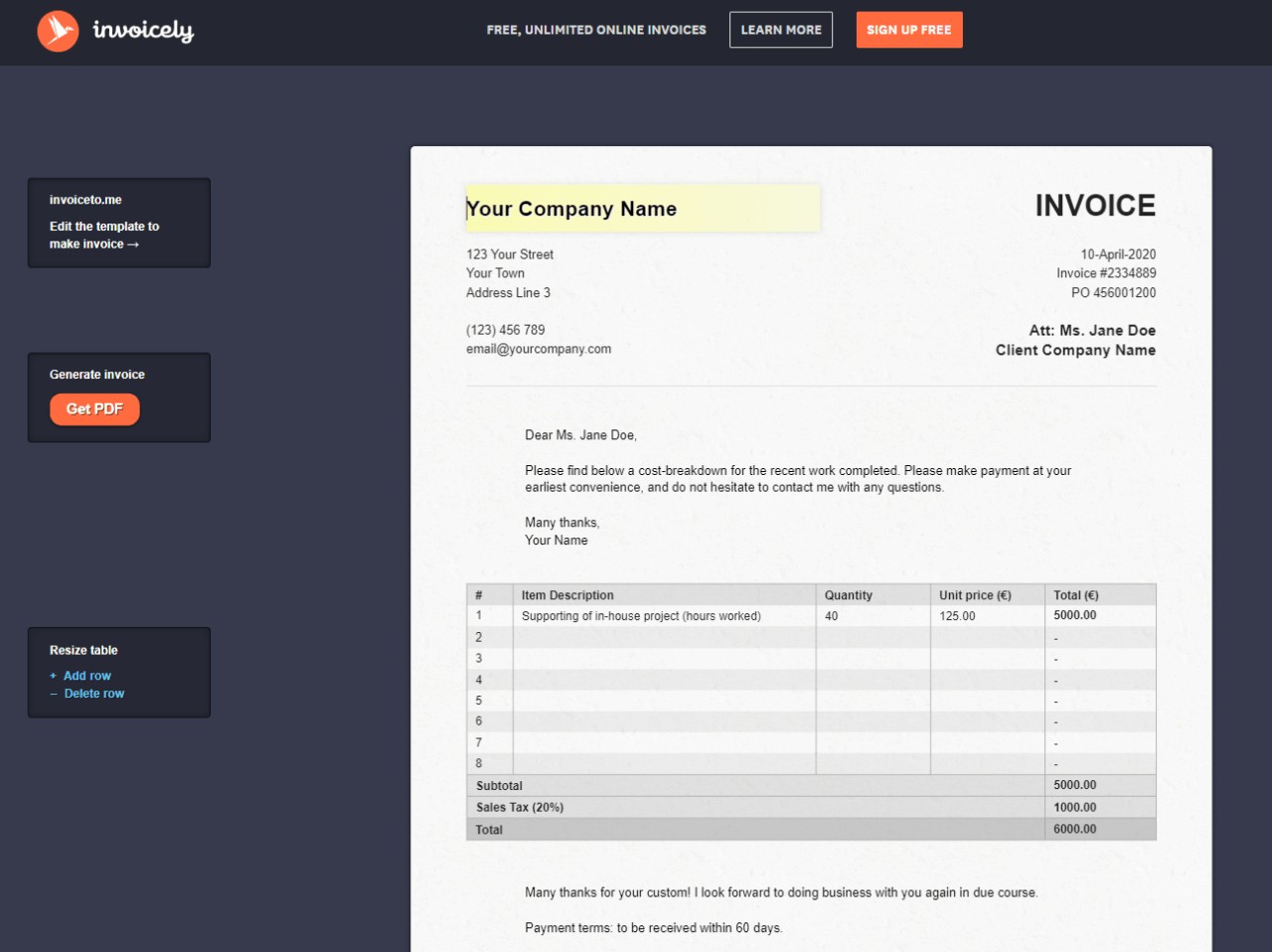
You create, save, and send an invoice by typing your terms directly into the on-screen form, downloading the file, and emailing it manually to your client. The minimalist interface operates as a strict WYSIWYG editor, giving you real-time PDF generation without jumping between clunky draft screens and separate preview windows.
Editing Fields and Calculations
The visual editor allows you to click naturally on any formatted field — from your corporate address to specific service line items — and simply replace the placeholder text with your real data. The overall document structure adapts instantly on your screen as you type out the descriptions of your physical labor.
A major benefit for rushed or exhausted contractors is the built-in math logic running quietly in the background. The template performs fast auto-calculations for your subtotals, standard taxes, and final totals, offering you an essential layer of manual error reduction.
Removing the human mathematical element from billing prevents the intensely awkward scenario of undercharging a hostile client because you accidentally transposed a number late at night. If you add or remove rows to intuitively accommodate complex multi-stage jobs, the final bottom line automatically adjusts to reflect your ongoing edits perfectly.
Exporting the Final Document
Once your specific service line items and accurate contact details are correct, exporting the file is a frictionless, one-click process. You simply tap the prominent Generate Invoice button resting at the base of the web form to extract your finished work immediately.
The platform natively downloads a perfectly formatted, locally stored PDF directly to your hard drive or mobile files folder. Unlike many online options claiming to be entirely free, the resulting document is remarkably clean. Your client will not be forced to look at any obnoxious third-party web watermarks or forced corporate branding plastered across the footer of your bill.
This entirely professional presentation matters intensely for your reputation. You effectively get the sleek visual polish of a high-end corporate accounting firm while using a completely free web application on the fly.
Bypassing the Database With a Custom URL Bookmark
You cannot permanently save client data or your overall billing history on InvoiceToMe because the platform purposefully does not host traditional user accounts. This architectural rule represents the single biggest mechanical limitation of utilizing an instant, serverless web generator for your operations.

If you spend twenty tedious minutes formatting a complex architectural bill and accidentally refresh the active tab, your data vanishes instantly. The platform features no backend database to sympathetically catch your careless mistakes or store past entries. However, I have executed an easy insider workaround for five years that decisively solves the platform’s biggest systematic flaw.
You solve this limitation by strategically leveraging native browser mechanics to create custom URL bookmarking, which provides brilliant template persistence without needing an account. Just open a completely blank invoice, fill out your static personal details — your corporate name, acceptable payment terms, and typical hourly rate — and leave the specific external client details entirely blank.
Once your base info is successfully typed in, bookmark the actively modified URL displayed in your browser. Clicking that specific browser bookmark next month will load the site with your base details already injected precisely into the form, functionally saving you from retyping your own business address every single time.
Why Stateless Architecture Secures Financial Data
InvoiceToMe is highly secure for handling sensitive external financial data precisely because it actively refuses to store your private information on its own corporate servers. We constantly assume that software inherently requires password-protected login screens to be safe, but a lack of accounts functions as a massive structural security asset.
Because the minimalist platform relies deliberately on a stateless architecture, it fundamentally provides an inherently superior baseline for true data privacy. The original platform developers cannot accidentally leak your clients’ confidential office addresses or total payment histories because they technically do not possess that data. You are merely borrowing their blank form, not surrendering your hard-won corporate metrics to a vulnerability-prone data center.
While you are heavily typing into the live generator, your direct connection remains fully protected from observation. The platform utilizes standard SSL (Secure Sockets Layer) tech, authenticated via a formal SSL certificate, to encrypt the network tunnel between your personal machine and the web host.
This robust HTTPS connection ensures your entire active browser session is completely locked down. Even if you are drafting invoices from a public coffee shop Wi-Fi network, the sensitive financial details you type simply cannot be intercepted by bad actors, guaranteeing your short-term drafting process is quiet and highly secure.
Integrating Static Files Into a Freelance Tax Routine
Yes, you can easily export your InvoiceToMe files directly to a universally readable PDF format, but managing those exact files after the initial download is entirely your own responsibility. Because the tool absolutely does not cleanly integrate with broader accounting software, you must aggressively build your own manual tracking workflows.
Managing Files on Mobile Browsers
Executing clean bills on a massive desktop is straightforward, but modern contractors increasingly run their chaotic operations from the driver’s seat of a truck. When you open the form on a mobile browser, tapping through the fields works perfectly fine, but the friction spikes heavily during the final export phase.
Phones fundamentally lack traditional visual desktop environments, so a freshly downloaded file inevitably gets buried within a generic local downloads folder. To run a truly tight digital operation, you are forced to establish a rigid manual filing system on iCloud or your internal device storage.
The precise moment you generate the document on your phone, you must ruthlessly route it into a strictly dedicated invoice folder. If you let these critical files sit forgotten alongside random internet snapshots, your corporate tax preparation at the close of the year will become an absolute nightmare.
Reconciling Offline Payments
A clean, standalone file generator fundamentally handles the initial request for physical money brilliantly, but it offers precisely zero operational assistance with actually closing out the active transaction. You must consistently and manually bridge the massive gap between physically sending the bill and accurately confirming the cash actually arrived.
When you rely exclusively on these kinds of simple native systems, you critically lack the automated payment gateways that securely handle rapid invoice reconciliation on much larger subscription platforms. If a terrible client eventually promises to wire cash on Friday morning, it is entirely on your shoulders to vigorously check your specific bank account manually on Monday.
This operational requirement aggressively forces you to build a dedicated external spreadsheet to relentlessly track your outstanding monetary balances. You have to physically mark documents as paid yourself, and you remain solely responsible for sending out those highly awkward follow-up text messages.

InvoiceToMe Review: Weighing the Core Pros and Cons
The main pros of InvoiceToMe are its zero-cost baseline, lightning-fast generation speeds, and absolute data privacy, while the primary cons remain the complete lack of a client database, dynamic payment integrations, and automated reminder emails. Evaluating this tool effectively comes down to realistically calculating exactly how much administrative manual labor you are willing to calmly tolerate.
On the positive operational side, you essentially gain an incredibly fast, highly anonymous financial instrument. You never hit a subscription paywall restricting how many individual files you can safely generate per quarter. You maintain absolute personal control over your financial data precisely because you never blindly hand it over to a faceless tech corporation.
The concrete trade-offs are equally grounded in harsh reality. The strict fundamental absence of an integrated client database dictates that seamlessly scaling your business to fifty recurring accounts will become a miserable logistical nightmare. Furthermore, the platform offers absolutely no built-in digital method for actively accepting major credit cards, aggressively forcing you to organize third-party checkouts manually.
If your specific daily operations require you to automatically track unpaid balances or actively fire off scheduled penalty emails for incredibly late payments, this is absolutely not your software. You effectively have to decide immediately if the raw speed of a fast no-registration tool realistically outweighs the tedious physical labor strictly required to monitor your own cash flow actively.
When to Upgrade to Zoho Invoice, Wave, or PayPal
The best completely free software alternatives to InvoiceToMe for operating small businesses seamlessly are Zoho Invoice for dedicated client lifecycle management, Wave for comprehensive backend bookkeeping, and PayPal Invoicing for extremely rapid digital checkout speeds. Upgrading becomes critically mandatory the precise moment your active client roster dramatically outgrows your brain’s capacity to confidently remember who owes you money.
Zoho Invoice for Relations
As your chaotic operation shifts gradually from desperate one-off networking gigs to highly structured ongoing contracts, relationships strictly dictate your ultimate cash flow. If you actively manage client retention, heavily graduating to Zoho Invoice deliberately provides the professional technical infrastructure required to successfully service demanding corporate clients.
Zoho is an absolute powerhouse alternative largely because it remains completely free while impressively offering unlimited invoices to users. The real operational threshold for pulling the trigger on switching is when you firmly transition away from random one-off billing to strictly needing a dedicated client portal.
Giving your high-value customers a beautifully integrated dashboard where they can securely log in, visually review their historical payment histories, and access past project files massively elevates how your personal brand is perceived.
Wave for Bookkeeping
Growing freelance operations inevitably encounter a terrifying moment when looming tax season arrives and the sheer total volume of poorly named downloaded PDFs no longer matches the deposits inside the corporate checking account. When manual folder tracking entirely breaks down, you desperately require the robust backend data reconciliation flawlessly provided by a free platform like Wave.
Wave acts dynamically as an all-in-one financial tool by cleverly bundling zero-cost billing directly into real, compliant accounting software. The primary operational upgrade trigger here is frankly sheer document volume.
When you carefully connect Wave securely to your active business checking account, the powerful software automatically scans your incoming bank deposits and beautifully matches them directly against the bills you aggressively sent out over the month. It seamlessly removes the guesswork from tedious tax preparation entirely.
PayPal for Gateways
Sometimes the core operational bottleneck isn’t managing tedious client relationships or organizing massive quarterly taxes—it is simply getting the cash moved smoothly from their particular screen to your account instantly. If you desperately need immediate digital checkout speeds to survive the weekend, utilizing a payment-processor-first approach is the strategic structural move.
Relying exclusively on a simple offline PDF generator often means you are asking your client to manually process a slow bank transfer or mail a physical paper check—both of which cause entirely unnecessary payment delays. By deploying PayPal Invoicing directly, you securely connect your financial requests directly to an entrenched, highly trusted checkout gateway.
This gracefully removes all friction for the consumer holding the physical wallet. While you technically still maintain the option to boldly integrate separate merchant providers like Stripe with much larger software suites, generating a bill natively through standard PayPal ensures your lazy client can literally just click a blue button and easily finalize the transaction.
Final Verdict on Small Business Billing Tools
InvoiceToMe remains an elite, flawless micro-tool perfectly suited for modern freelancers who desperately need to fire off a prompt bill without hopelessly wrestling with complicated enterprise software. Running a small independent business is inherently chaotic, but your essential administrative software stack objectively doesn’t have to be.
Crippling technological complexity is entirely optional regardless of exactly how long you have been actively operating in continuous business. You do not inherently outgrow straightforward, consistently functional utilities directly just because you aggressively cross an arbitrary revenue threshold on paper. I strongly recommend deliberately bookmarking this specific web application as your designated, zero-cost backup solution for absolute billing emergencies.
If your incredibly expensive primary software suite eventually experiences a massive server outage, or if you simply land an exceptionally weird side-job on a Sunday night that absolutely doesn’t clearly belong in your standard corporate financial books, you inevitably still need to collect your money gracefully. Stop over-researching massive, bloated software platforms when you literally don’t even have a paying client yet. Just generate your pending file immediately, get paid quietly, and effectively get back to the actual work.
Frequently Asked Questions
Is InvoiceToMe actually completely free, or are there hidden premium tiers?
It is entirely free to use with zero hidden costs, usage limits, or paywalls. You aren’t even required to hand over your email address or create an operational backend account. You just open the sterile web page, generate your billable hours, and instantly download the file.
Can I save my business details on InvoiceToMe without making a user account?
Yes, by strategically leveraging your browser’s native bookmark mechanic. Just fill out a blank invoice with your basic corporate details and standard hourly rate, then immediately bookmark that active URL. Clicking that specific bookmark later will load the site with your static baseline data already surgically injected into the form.
Why is InvoiceToMe considered secure if it doesn’t use password-protected logins?
The platform’s absolute lack of accounts is precisely what makes it highly secure. It relies on a stateless architecture, meaning the developers cannot accidentally leak your clients’ confidential payment histories because they technically don’t possess the data. The entire active drafting session happens over an encrypted HTTPS connection and never hits a vulnerability-prone database.
Can clients pay me directly with a credit card through the final InvoiceToMe PDF?
No, the platform fundamentally lacks any automated payment gateways or digital checkout links. You are generating a standalone offline document requesting an eventual wire transfer or physical paper check. If you require clients to instantly click a blue button and pay online to survive the weekend, you need a processor-first tool like PayPal Invoicing.
Does the free web generator slap a watermark on the downloaded file?
Absolutely not, and that is one of the tool’s greatest operational strengths. When you hit export, the platform generates a remarkably clean, locally stored PDF. Your client will never see a forced corporate logo or an obnoxious third-party watermark plastered across the footer of your bill.
What’s the exact difference between relying on InvoiceToMe and upgrading to Wave?
InvoiceToMe acts exclusively as a dumb, lightning-fast PDF generator, offering exactly zero assistance with actually tracking who has paid you. Wave acts dynamically as a comprehensive backend bookkeeping suite that connects to your standard business checking account. You automatically graduate to Wave the precise moment manual spreadsheet tracking becomes a miserable tax-season nightmare.

