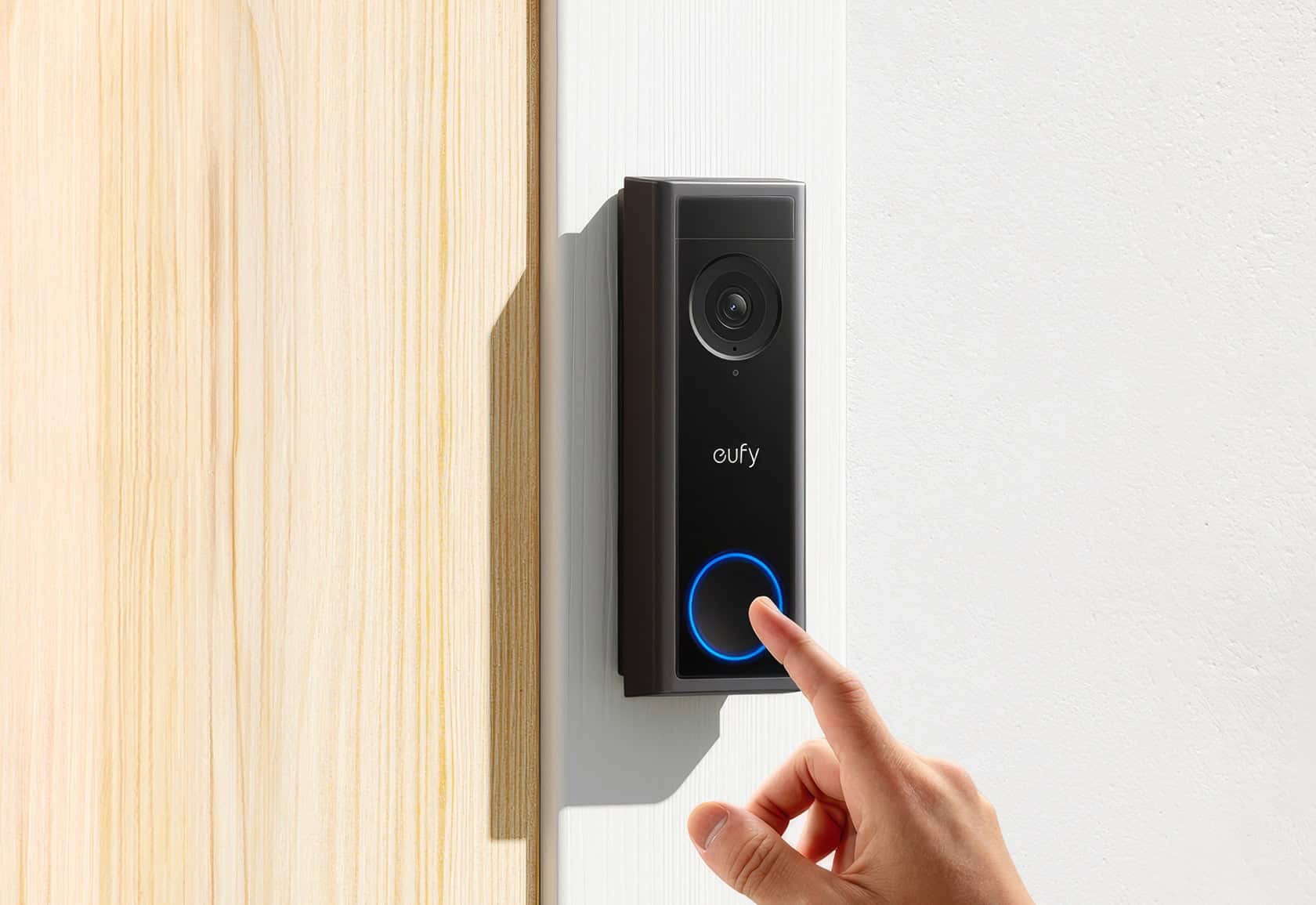
Every smart home brand wants to sell us a lifetime subscription just to look at our own front porch. Eufy pitches the Eufy Video Doorbell C30 as the ultimate escape hatch: a 2K, wireless doorbell with local storage and zero monthly fees. It sounds like the perfect low-maintenance setup for anyone tired of getting nickel-and-dimed by cloud storage apps.
But as any guy trying to build a functional home security setup knows, “no subscription” can sometimes be a trap for underpowered hardware. While this wire-free camera is solid, well-built, and easy to mount, the local storage structure comes with a catch. Crucial alerts take time to process, which means a courier might already be driving away by the time your phone finally buzzes.
Key Takeaways
Text alerts take an average of 7.7 seconds to arrive, while rich image thumbnails average 18.2 seconds, which often results in empty porch notifications after a visitor has walked away.
The 5,000mAh battery is non-removable, requiring you to physically unmount the entire unit with a special pin key every 70 days to charge it indoors via USB-C.
Standard storage uses a local microSD card (32GB included, supporting up to 128GB) with on-device encryption, but administrative accounts lack third-party authenticator app support.
Table of Contents
Quick Verdict and Key Decision Criteria
Before you grab your drill, it’s worth weighing the actual cost of skipping a cloud subscription. Deciding on the Eufy C30 comes down to balancing free local storage against daily convenience.
The primary tradeoffs at a glance
On one hand, you get crisp 2K video during the day, a fast 15-minute wireless setup, and zero monthly cloud fees. On the other hand, you have to deal with a sluggish 18.2-second delay for image thumbnails, no support for your existing wall chime, and the chore of pulling down the entire unit to charge it. “Subscription-free” isn’t entirely free if you pay for it in physical maintenance and slow notifications.
Who should buy and who should skip
You should buy the Eufy C30 if you value your privacy, hate monthly fees, and already own a Eufy HomeBase 3 (S380) to anchor your home’s security network. It’s a great secondary camera for side doors or low-traffic areas. You should skip it if you have a busy front door, need to have conversations with delivery drivers, or want package tracking to keep an eye on deliveries.
The Storage Strategy and Ecosystem Value
Out of the box, the C30 stores your footage locally using a microSD card slot located on the back of the device. Eufy packs a 32GB card in the box, and the slot supports cards up to 128GB. This bypasses the cloud, meaning your data stays on your physical hardware.
However, using a standalone card brings up the “HomeBase Dependency Paradox.” Local card storage is free, but decrypting raw video files directly from a low-power camera card is slow. When you open the app to watch a recorded clip, the camera has to wake up and decrypt the video on the fly, leaving you staring at a loading circle for several seconds. If you want to jump back and scrub through footage, you can’t—high-speed scrubbing is disabled on standalone card storage.
To fix this latency, you can link the C30 to the Eufy HomeBase 3 (S380), which boosts network performance and scales central storage all the way up to 16TB. It solves the speed problem, but it also forces you to buy an expensive secondary hub, turning a budget doorbell into a larger investment.
Real-World Performance: Video Quality, AI Limits, and the “Alert Gap”
Evaluating this doorbell requires understanding how hardware constraints impact routine security tasks. We measured latency, image fidelity, and AI reliability to see if the device remains functional for modern threshold monitoring.
Video resolution, exposure balance, and night performance
The C30 shoots at 2176 x 1224 resolution (2K Full HD) with a 16:9 vertical-stretched layout. In daylight, the picture is sharp, landing a clean read on a technical text chart out to 7.5 meters (24 feet). The dynamic range does a great job balancing bright midday glare without blowing out the highlights.
Night vision is where things get a bit fuzzy. To get a brighter image in the dark, the camera relies on long exposure times, which introduces a lot of fuzziness and poor resolution. If you want crisp nighttime detail, higher-end models like the Eufy E340 or the device evaluated in this Eufy Indoor Cam S350 review easily outperform it.
The sensory-to-notification lag and the “empty frame” dilemma
The biggest bottleneck with the C30 is its notification speed. In real-world testing, text notifications average 7.7 seconds to hit your phone, while rich image thumbnails take 18.2 seconds to process and arrive.
[Motion Detected]
 ├─► 7.7 Seconds: Text Alert (Someone is at your door)
 └─► 18.2 Seconds: Rich Image Thumbnail Delivered
This delay leads to the “empty frame” dilemma. When you get a rich notification and tap to open it, you often find yourself looking at an empty porch because the visitor already walked away during that 18-second processing window. Oddly enough, the motion sensor itself wakes up so fast that if it does capture a thumbnail, it often snaps it too quickly—giving you a perfect photo of a courier’s shoulder or elbow before they ever step into full frame.
AI capabilities and two-way audio restrictions
The on-device active AI is straightforward. It features human recognition that filters out false alarms, hitting a 98% accuracy rate when ignoring blowing wind, swaying plants, or passing cars. However, it lacks detection for packages, animals, vehicles, or familiar faces.
If you want to use the intercom to talk to someone at the door, the outdoor speaker is loud and clear enough. But the microphone pickup on the doorbell is muffled, and a persistent 2-second audio latency makes natural conversation almost impossible. You’ll constantly find yourselves talking over each other like you’re on an old walkie-talkie.
Hardware Upkeep, Installation, and Physical Realitie
A wire-free install means you don’t have to fiddle with old wiring. However, the physical design introduces some unique maintenance chores you’ll have to manage.
Mounting, physical durability, and extreme weather profiles
The doorbell features a clean black plastic design with a sturdy mount that doesn’t flex. The back of the housing holds a rubber weather seal protecting the microSD card slot and the USB charging port. It has an IP65 weatherproof rating and operates between -4°F and 122°F, meaning it holds up fine in rain or cold nights, though true freezing winter temperatures will always degrade lithium-polymer battery life over time.
The real maintenance headache is the charging tax. Because the 5,000mAh battery is non-removable, you cannot swap out a dead battery pack. Every 70 days when the battery dies, you must use a special pin tool to unmount the entire doorbell from your house and carry it inside to charge over USB-C. Your front entrance is completely unprotected and unmonitored for several hours while the unit charges.
Incompatibility with legacy analog chimes
If you have an old mechanical chime box on your wall, the C30 won’t talk to it. It operates completely wire-free and cannot trigger standard analog physical doorbell circuits. To hear a ring inside your home, you have to buy separate wireless chimes or configure your smart displays and speakers to announce visitors.
Smart Home Integration and Security Protocols
Connecting your doorbell to the rest of your house is easy if you use the right platforms.
Integrating smart speaker screens and automation setups
The C30 integrates nicely with Amazon Alexa and Google Assistant, allowing you to pull your front door feed directly onto smart speaker screens like an Echo Show. If you tap the doorbell tile in the native Eufy app, the stream starts fast—between 0.9 and 1.7 seconds, extending to 1.2 to 3.9 seconds when answering a live ring.
However, pulling that same stream onto an Alexa or Google smart display introduces extra lag. If you are an Apple user, keep in mind that this doorbell does not support Apple HomeKit.
Local video encryption vs. administrative account access
There is a strange security paradox baked into Eufy’s software. Your local footage is safely protected by on-device encryption on the microSD card.
[Local Footage] ──► Encrypted On-Device (Highly Secure)
[Account Login] ──► SMS or Email Codes Only (No Authenticator App Support)
However, account security is limited. The system does not support third-party authenticator apps (2FA), leaving you to rely on basic SMS or email verification codes to secure your administrator login. Once you have logged in, you can unlock the app easily using your phone’s biometric sensors, and you can map out custom privacy zones in the app to avoid recording your neighbor’s property.
Filling the Feature Gaps: C30, C31, and HomeKit Workarounds
If you want the Eufy ecosystem but want to bypass some of these limitations, you have options.
First, if removing the entire doorbell to charge it sounds like an annoying chore, look into the Eufy C31. It uses a very similar design but supports traditional low-voltage hardwiring, meaning you can wire it to your home’s power and skip the 70-day charging cycle entirely.
For Apple users who want to bypass the HomeKit omission, you can use Homebridge software on a local server or set up virtual Alexa routines to bridge the C30 feed into your HomeKit automation environment.
Final Buying Verdict
When you line the Eufy C30 up against the competition, the value proposition is clear but compromised. Compared to the Ring Battery Doorbell Plus, the C30 stands out because it doesn’t force you into a monthly subscription to view your own footage. However, if you compare it to the Eufy E340, you lose out on dual-camera package tracking and night-vision clarity.
If you want a simple, private, subscription-free camera for a low-traffic door, the C30 is a budget build. But if you have a busy front porch and want to chat with delivery drivers, the 18.2-second alert delay and muffled microphone might drive you crazy.
Frequently Asked Questions
Is the eufy C30 doorbell camera any good?
It is a reliable, subscription-free option if you prioritize privacy and local storage, but it comes with performance trade-offs. While it offers sharp 2K daylight video, you should be prepared for significant notification delays and the need to physically unmount the unit every 70 days for charging.
How long does the eufy C30 doorbell battery last?
The 5,000mAh battery typically lasts about 70 days per charge under normal usage. Because the battery is non-removable, you must unmount the entire doorbell housing using a pin key and charge it indoors via a USB-C cable when it runs dry.
Does the eufy C30 doorbell require HomeBase?
No, it functions as a standalone unit using an internal microSD card for local storage. However, adding a HomeBase 3 can significantly reduce the latency issues and slow decryption speeds that occur when the camera operates on its own.
What is the difference between eufy C30 and E340 doorbell?
The E340 is a more advanced model that includes dual cameras for package tracking and superior night vision clarity. The C30 is a more budget-friendly, simplified device that lacks specialized package detection and advanced low-light performance.
Why do my notifications arrive after visitors have already left?
The C30 experiences a noticeable delay, with text alerts averaging 7.7 seconds and image thumbnails taking up to 18.2 seconds to process. During this time, the camera is decrypting data from the local storage, which often results in you opening a notification only to see an empty frame.
Can I use the C30 with my existing mechanical doorbell chime?
No, the C30 operates entirely wire-free and is not compatible with traditional low-voltage mechanical chime boxes. You will need to use your smartphone, set up announcements via smart speakers, or purchase a separate wireless chime to hear an alert inside your home.
How much storage space does the eufy C30 support?
The device comes with a 32GB microSD card and supports expansion up to 128GB. Because this storage is local and encrypted by default, you avoid monthly cloud fees, though scrubbing through footage may be slower than cloud-based alternatives.