
Thinking about a starting an online business checklist can feel like a lot, right? You’ve got a great idea, but the long list of legal tasks and tech choices can make you want to give up before you even begin.
If you feel that way, you are definitely not the only one.
Data from the U.S. Bureau of Labor Statistics shows that about 20% of small businesses fail within their first year. That might sound intimidating, but it also means a full 80% make it.
The difference often boils down to having a clear, simple plan.
I’m going to walk you through the exact steps to get started, and I think you’ll be surprised at how manageable it can be. Let’s dive in.

Key Takeaways
Beat the Odds: While around 20% of businesses fail in year one, following a step-by-step checklist drastically improves your chances of survival and success.
Smart Research: Don’t just guess. Use free tools like Google Trends and the Facebook Ad Library to see exactly what your competitors are doing and selling before you spend a dime.
Legal Protection: Registering an LLC costs an average of $132 in state filing fees and protects your personal assets from business risks and debts.
Bank Better: Open a separate business bank account immediately. Options like Bluevine offer up to 3.0% APY with no monthly fees, which is much better than most traditional banks.
Boost Sales: Enable accelerated checkouts like Shop Pay on your store. These options can increase checkout conversion rates significantly compared to guest checkout.
Table of Contents
Planning Your Online Business
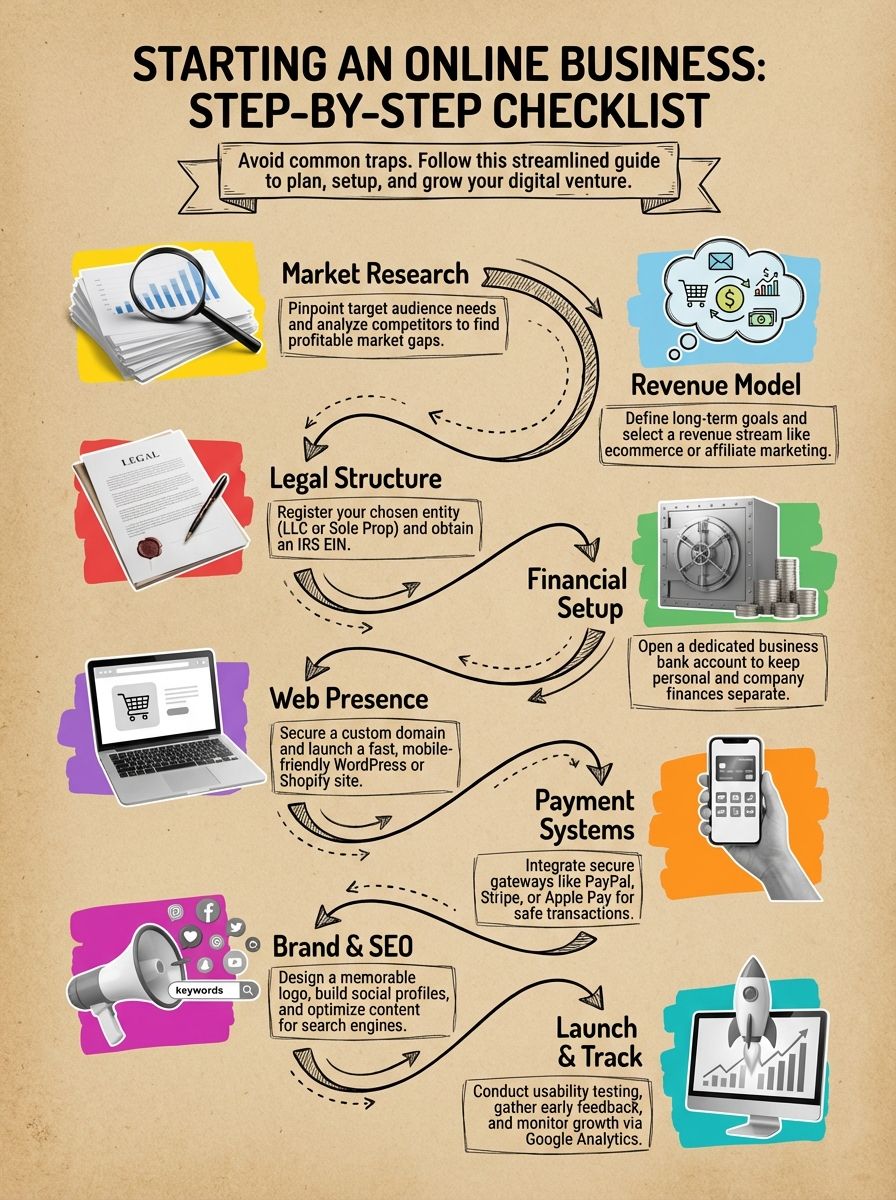
Ready to turn that idea into a real business? The first step is to validate your idea with some smart research. Luckily, there are powerful and free tools that can become your best friends.

What is your business idea and who is your target audience?
Every great business starts by solving a specific problem for a specific group of people. For example, my focus is on men between 25 and 50 who want digital tools that make their work and daily routines easier.
Your plan needs a sharp focus on the customer’s pain points. A great way to start is with a market research snapshot. I recommend using Google Trends to see if interest in your niche is growing or shrinking over the last 12 months.
- Find Real Problems: Spend time on Reddit in forums like r/smallbusiness or niche-specific subreddits. You’ll find unfiltered complaints and desires that point to real market needs.
- Validate Your Idea: Use a free tool like SurveyMars to create a quick survey and get direct feedback from your potential audience before you build anything.
You also need to understand their buying habits. Are they active on Instagram or do they prefer professional networks like LinkedIn? Do they use credit cards or prefer faster options like Apple Pay? Answering these questions shapes everything from your marketing to your website’s checkout process.
How do you conduct market research and analyze competitors?
Use data to guide your decisions. The U.S. Small Business Administration offers incredible resources, including a free Entrepreneurship Readiness Assessment to see if you’re prepared for the journey.
A fantastic insider trick for competitor analysis is using the Facebook Ad Library. This free tool lets you search for any competitor and see the exact ads they are running. If they’ve been running the same ad for months, it’s a good sign that it’s profitable.
Pro-Tip: To dig even deeper, use a tool like Semrush (which offers a free plan) to see what keywords your competitors rank for on Google. This can reveal their entire content strategy and show you opportunities to cover topics they’ve missed.
Don’t be afraid of busy markets, they are a sign of real demand. Analyze your competitors’ websites, read their customer reviews, and subscribe to their email lists. This is the fastest way to spot their weaknesses and find gaps you can fill.
Maybe you can offer better customer support with a live chat tool or provide more flexible payment options. Mentors from SCORE.org can also provide quick feedback, saving you time and money before you move forward.
How do you set long-term goals and choose a revenue model?
Start by setting a clear, long-term goal. Do you want to build a small side hustle for extra income, or are you aiming to create a large asset you can sell one day?
Your long-term vision will guide your daily decisions. Once you know your goal, you can choose a revenue model that fits. Some of the most profitable online business models include SaaS (Software as a Service) and selling digital products, which often have profit margins between 70-90%.
| Revenue Model | Best For | Example |
|---|---|---|
| E-commerce | Selling physical products directly. | Christina DuVarney’s clothing brand, Beautiful Disaster. |
| Affiliate Marketing | Earning commissions by promoting others’ products. | David Tao’s content site, BarBend. |
| Digital Products | Selling courses, templates, or e-books. | Selling a course on a platform like Teachable or Kajabi. |
Most of these models require little more upfront than a domain name and a way to accept payments. For more in-depth strategies that work in the real world, check out this guide on how to grow an online business.
Setting Up the Legal Structure
Now for the part that often trips people up: the paperwork. Let’s break it down into simple, manageable steps to get your business set up legally and protect your personal assets.
How do you choose a business name and entity type?
First, check if your business name idea is available in your state’s business database. At the same time, use a tool like Instant Domain Search to see if the matching .com domain is free. You want these to match for brand consistency.
Next, you need to choose a business structure. The most common options are a sole proprietorship or a Limited Liability Company (LLC).
I chose an LLC for my own business because it provides a legal separation between my personal assets (like my house and car) and my business debts. This gives you incredible peace of mind if things go wrong.

LLC filing fees vary a lot by state. For instance, forming an LLC in Kentucky costs about $40, while in Massachusetts it’s $500. The national average is around $132. You can file yourself or use a service like ZenBusiness or Bizee to handle the paperwork for you, which often costs between $40 to $150 plus state fees.
Finally, consider protecting your brand name by filing a trademark with the U.S. Patent and Trademark Office. This prevents copycats from using your name down the road.
What steps are needed to register your business and get licenses?
First things first, get an Employer Identification Number (EIN) from the IRS website. It’s a short, free online application, and you’ll get the number instantly. You’ll need this to open a business bank account.
Next, file your business formation papers with your state. If you formed an LLC, this is usually called the “Articles of Organization.” If you’re a sole proprietor using a trade name, you might need to file for a DBA (“Doing Business As”).
Pro Tip: When registering your LLC, use a Registered Agent service like Northwest Registered Agent instead of your home address. It typically costs around $100 a year, keeps your personal address off public records, and saves you from a mountain of junk mail.
Don’t forget about licenses and permits. Depending on what you sell and where you’re located, you may need local or state business licenses. Check your state’s official website for requirements.
Finally, look into small business insurance. General liability insurance is a must for most businesses to protect against accidents or lawsuits. Some states also require workers’ compensation insurance, even if you only have one employee.
How do you open a business bank account?
Once you have your business registration documents and EIN, you can open a business bank account. It is crucial to keep your personal and business finances separate from day one. This makes accounting and tax time much simpler.
You don’t have to go with a traditional bank. Modern fintech banks are built for online businesses and often have better features and fewer fees. For example, Bluevine offers a high-yield checking account, while Relay lets you open up to 20 separate checking accounts to organize your money using the “Profit First” method.
| Online Bank | Best Feature | Monthly Fee |
|---|---|---|
| Bluevine | High APY on checking (up to 3.0%) | $0 |
| Mercury | No fees on wires, great for startups | $0 |
| Relay | Up to 20 checking accounts for budgeting | $0 |
After opening your account, apply for a business credit card. This helps build your business credit history, which is important for securing loans or better terms in the future.
Building Your Online Presence
With the legal and financial foundation in place, it’s time to build your digital storefront. This starts with securing your domain name and choosing the right platform to build your website.

How do you register a domain and select a hosting provider?

Use a site like Instant Domain Search to find an available domain. Stick with a .com if possible, as it’s the most credible and recognizable extension. Keep it short, memorable, and avoid hyphens.
During registration, be sure to add privacy protection. This keeps your personal contact information out of public databases. Many modern registrars like Namecheap and Porkbun now include this for free.
When it comes to web hosting, you have many choices. For a WordPress site, providers like Bluehost or SiteGround are popular for their reliability and ease of setup. Good hosting is critical because website speed directly impacts sales. A one-second delay in page load time can reduce conversions by up to 7%.
How can you build a professional, mobile-friendly website?
Your website builder is your most important tool. For flexibility and strong SEO, WordPress.org is a top choice. For e-commerce, Shopify is a powerhouse that handles products and payments seamlessly.
No matter which platform you choose, a mobile-friendly design is non-negotiable. Mobile commerce is expected to account for nearly 60% of all online retail sales in 2026. If your site is clunky on a phone, you’re losing customers.
Actionable Tip: Use fast-loading themes like Astra or GeneratePress for WordPress. Before you upload any images to your site, compress them with a free tool like TinyPNG. Large images are the number one cause of slow websites.
If the tech side of things feels overwhelming, you can hire a freelance web developer on a platform like Upwork. However, modern website builders are so intuitive that most people can create a professional-looking site themselves and save money.
What are the options for setting up secure payment gateways?
A payment gateway securely processes customer payments. Your choice here affects both user experience and your bottom line. The two biggest players are Stripe and PayPal, and their fee structures are slightly different.
| Feature | Stripe | PayPal |
|---|---|---|
| Transaction Fee (US) | 2.9% + 30¢ | 3.49% + 49¢ (Standard) |
| User Experience | Keeps customers on your site. | Often redirects to PayPal’s site. |
| Best For | A seamless, professional checkout. | Brand recognition and trust. |
For a business processing $50,000 a month, PayPal’s higher fees could cost an extra $5,820 per year compared to Stripe. If you use a platform like Shopify, their built-in Shopify Payments (powered by Stripe) is often the easiest and most cost-effective option.
Always ensure your chosen gateway is PCI DSS compliant. This is the industry standard for protecting customer credit card data. Also, make sure to offer multiple payment options, like credit cards, Google Pay, and Apple Pay, to maximize conversions.
Developing a Marketing Strategy
You’ve built the store, now you need to bring people to it. A solid marketing strategy ensures your brand gets seen by the right people, even in a crowded market.
How do you create a brand identity and design a logo?
Your brand identity starts with your “Brand Heart.” This defines what your business stands for, its core values, and the promise you make to your customers. Every decision, from your logo colors to your ad copy, should align with this.
You don’t need to be a designer to create a great logo. AI-powered tools like Canva or Looka can generate professional logos in minutes. If you have a bit more budget, you can hire an affordable designer on a platform like Fiverr.
- Be Consistent: Use the same logo, colors, and fonts across your website, social media, and emails. This builds brand recognition.
- Keep it Simple: A good logo is easy to recognize at a glance and works well in different sizes, from a tiny favicon to a large banner.
Once you have your visual elements, create a simple one-page brand guidelines document. This will help ensure everyone on your team (even if it’s just you) uses your branding consistently.
How do you build social media accounts and create a content calendar?
First, claim your business name on the social media platforms where your target audience spends their time. Even if you don’t plan to be active everywhere, securing the handles prevents others from taking them.
Create professional profile images and banners that match your brand identity. You can use tools like Canva or Adobe Express to easily create eye-catching graphics.
“Did you know? SMS marketing has an open rate as high as 98%, compared to just 20% for email. Integrating text message marketing with a tool like Klaviyo is one of the fastest ways to reach your customers directly.”
To stay organized, use a content calendar. This can be a simple Google Sheet or a dedicated scheduling tool like Buffer or Later. Planning your content ahead of time saves stress and ensures you post consistently.
Follow the 80/20 rule for content. 80% of your posts should be helpful, educational, or entertaining, while only 20% should be directly promotional. This builds an engaged audience that trusts you.
How can you implement SEO to increase organic traffic?
Search Engine Optimization (SEO) is the process of getting your website to show up on Google for free. It starts with smart keyword research. Use a tool like AnswerThePublic to find the questions people are asking related to your niche.
Focus on creating genuinely helpful content that answers those questions. If you’re on WordPress, use a plugin like Rank Math or Yoast SEO. These tools guide you through optimizing your title tags and meta descriptions, which can draw more clicks from search results.
- Internal Linking: Link between related articles on your own site. This helps visitors discover more of your content and helps Google understand your site structure.
- Mobile Usability: Ensure your site is fast and easy to use on mobile devices. This is a major ranking factor for Google.
- Update Old Content: SEO isn’t a one-time task. Regularly update your old blog posts with new information to keep them relevant and ranking well.
High-quality content is the cornerstone of good SEO. Your goal should be to create the best, most helpful resource on the internet for your chosen topic.
Launching and Monitoring Your Business
Your website is live and the marketing engine is running. Now it’s time to test, learn, and optimize based on how real people interact with your business.
How do you test your website and improve user experience?
Before your big launch, you need to conduct usability testing. This involves watching real people try to use your website to spot confusing design, bugs, or anything else that causes frustration.
Use a free tool like Google PageSpeed Insights to check how fast your site loads. A slow website is one of the fastest ways to lose a sale, as 53% of mobile visitors will abandon a site that takes longer than three seconds to load.
Insider Tip: Install Microsoft Clarity on your site. It’s a completely free tool that provides heatmaps and session recordings, allowing you to see exactly where users are clicking and struggling on your pages.
Ask a few friends or family members (who will be honest) to complete a common task on your site, like finding a specific product and going through the checkout process. Watch them do it without giving them any help. Their feedback will be invaluable.
What are best practices for launching and gathering customer feedback?
Consider starting with a soft launch. This means you launch your business to a small, select group of early users first. You can offer them a special discount in exchange for their honest feedback before you announce it to the world.
From day one, make it easy for customers to leave reviews. Recent data shows that 93% of consumers read online reviews before making a purchase. You can use a service like Trustpilot or Yotpo to automatically email customers after a purchase and ask for a review.
- Automate Follow-ups: Use email or SMS to send a follow-up message a week after purchase asking for a review or testimonial.
- Engage on Social Media: Actively reply to comments and messages on your social media platforms to show you’re listening.
- Use Surveys: Send short surveys with a tool like SurveyMonkey or Typeform to get targeted feedback on specific aspects of your business.
How do you use analytics tools to track business performance?
You can’t improve what you don’t measure. Setting up analytics tools from the start is essential for making data-driven decisions.
Google Analytics 4 (GA4) is the most important tool to install. It’s free and will show you how people find your website, which pages they visit, and where they drop off. Key metrics to watch are your conversion rate and engagement rate.
Your accounting software, like QuickBooks or Xero, provides a real-time dashboard of your sales, profits, and expenses. This gives you a clear picture of your business’s financial health.
Focus on actionable metrics over vanity metrics. The number of likes on an Instagram post is a vanity metric. The number of people who clicked the link in your bio and made a purchase is an actionable metric.
If you have an e-commerce store, the analytics dashboard within platforms like Shopify or WooCommerce will show you which products are best-sellers and where your customers are coming from.
How Will Starting an Online Business Evolve in 2026?
The world of online business is constantly changing. As we look at 2026, global e-commerce sales are expected to surpass $6.42 trillion, creating massive opportunities for new entrepreneurs.
Artificial intelligence will play an even bigger role. AI-powered tools are already helping businesses with everything from writing SEO content to managing social media, making it easier than ever for solopreneurs to compete with larger companies.
Customer trust and transparency will remain paramount. With 93% of consumers relying on reviews, building a strong reputation through authentic feedback will be a key differentiator.
Ultimately, the fundamentals will stay the same. Entrepreneurs who focus on solving real problems, providing excellent customer service, and adapting to new technologies will be the ones who succeed.
People Also Ask
How can SMS marketing help when starting an online business?
It puts your message right in front of your customer, achieving a 98% open rate compared to the typical 20% for email. This speed allows you to cut through the noise and drive immediate sales for your new launch.
What steps should I take before using SMS marketing for my online store?
You must strictly comply with US laws like the TCPA by collecting clear, written consent before sending a single text. Once you are legal, choose a dedicated platform like Klaviyo or Postscript to automate your campaigns and track your results.
Is SMS marketing expensive for small businesses just getting started?
Most platforms charge just pennies per text message, giving you full control to scale your spending only as your revenue grows.
Can SMS marketing boost customer loyalty in my new online venture?
Texting creates a personal connection that drives retention, with data showing SMS subscribers often have a higher lifetime value than email-only customers. A quick, automated follow-up after a purchase shows you care about the product experience and builds long-term trust.
Resources
- https://www.businessnewsdaily.com/4686-how-to-start-a-business.html
- https://www.investopedia.com/start-an-online-business-7974054
- https://www.sba.gov/business-guide/launch-your-business/choose-business-structure
- https://ebsedu.org/blog/how-to-start-a-business/ (2026-01-21)
- https://www.websitespot.com/blog/how-to-register-a-domain-name/ (2017-02-10)
- https://www.jpkdesignco.com/blog/online-presence-checklist?srsltid=AfmBOooP_R7NIrRAD5Wb8swizvoXongIDBQbxCRavNaf42TELh91CQRw (2024-06-13)
- https://www.weareplanet.com/blog/setting-payment-gateway-step-by-step-guide (2023-09-25)
- https://www.researchgate.net/publication/228280377_Online_Payment_Gateways_Used_to_Facilitate_E-Commerce_Transactions_and_Improve_Risk_Management
- https://www.columnfivemedia.com/how-to-create-a-brand-identity/ (2025-09-19)
- https://www.facebook.com/groups/nbctribe/posts/837997737940628/
- https://www.adobe.com/express/learn/blog/guide-to-content-calendars (2023-06-28)
- https://inmotionmktg.com/blog/creating-a-content-calendar/
- https://www.mtu.edu/umc/services/websites/seo/
- https://maze.co/guides/usability-testing/website-usability-testing/
- https://undergraduatescr.lagosstate.gov.ng/uploaded-files/ZHOw1h/3OK063/OnlineBusinessLaunchChecklist.pdf
- https://ww2.jacksonms.gov/uploaded-files/ZHOw1h/3OK063/online-business_launch__checklist.pdf
- https://voice123.com/blog/marketing-trends-tactics/how-to-use-business-analytics-tools-to-track-performance/
- https://octolize.com/blog/how-to-start-an-online-business/?srsltid=AfmBOor1kbF0is_BMfvMBH1WUdv012H3DSkTlbVKCcOodU_eVzOQVVQF (2025-03-18)

